Channel Studio TDL
This tab allows you to configure individual fading paths (e.g., Path #0, Path #1, etc.) within the fading profile.
Each path can have its own parameters such as, power, delay, amplitude distribution, Doppler spectrum, and frequency settings.
Configuring individual fading paths provides flexibility to define a multipath fading environment for more realistic simulations.
The Fading Path tab has the following settings:
Adds a new fading path.
|
SCPI Command |
[:SOURce]:RADio:CSTDl:FADing:PROFile:PATH:ADD |
|
SCPI Example |
|
|
Couplings |
|
|
Preset |
|
|
State Saved |
Yes |
|
Initial S/W Revision |
A.19.00 |
Deletes a fading path based on the assigned fading index.
|
SCPI Command |
[:SOURce]:RADio:CSTDl:FADing:PROFile:PATH:DELete |
|
SCPI Example |
|
|
Couplings |
|
|
Preset |
|
|
State Saved |
Yes |
|
Initial S/W Revision |
A.19.00 |
Copies a fading path based on the assigned fading index and adds it at the end of the fading path list.
|
SCPI Command |
[:SOURce]:RADio:CSTDl:FADing:PROFile:PATH:COPY |
|
SCPI Example |
|
|
Couplings |
|
|
Preset |
|
|
State Saved |
Yes |
|
Initial S/W Revision |
A.19.00 |
Sets whether or not the current fading path is used to create a fading profile.
Ensure that State is set to ON for at least one fading path before you generate the fading profile.
|
SCPI Command |
[:SOURce]:RADio:CSTDl:FADing:PROFile:PATH<channel>:STATe ON|OFF|1|0 [:SOURce]:RADio:CSTDl:FADing:PROFile:PATH<channel>:STATe? |
|
SCPI Example |
|
|
Couplings |
|
|
Preset |
ON |
|
State Saved |
Yes |
|
Initial S/W Revision |
A.19.00 |
Sets the average received power of this fading path relative to the main path or the total power.
The value of this setting is relative in decibels.
|
SCPI Command |
[:SOURce]:RADio:CSTDl:FADing:PROFile:PATH<channel>:POWer <real> [:SOURce]:RADio:CSTDl:FADing:PROFile:PATH<channel>:POWer? |
|
SCPI Example |
|
|
Couplings |
|
|
Preset |
0 |
|
State Saved |
Yes |
|
Min |
-100 |
|
Max |
0 |
|
Initial S/W Revision |
A.19.00 |
Sets the Delay of a fading path representing the relative propagation time difference between that path and the first (reference) path. In other words, it indicates how much later the signal of this path arrives at the receiver compared to the earliest arriving signal.
|
SCPI Command |
[:SOURce]:RADio:CSTDl:FADing:PROFile:PATH<channel>:TIME:DELay <real> [:SOURce]:RADio:CSTDl:FADing:PROFile:PATH<channel>:TIME:DELay? |
|
SCPI Example |
|
|
Couplings |
|
|
Preset |
0 |
|
State Saved |
Yes |
|
Min |
0 |
|
Max |
100000 |
|
Initial S/W Revision |
A.19.00 |
Sets the statistical distribution of the signal’s amplitude (or strength) along that path. Options are Constant, Rayleigh, or Rice.
When the Constant option is selected, then you can set the Doppler Spectrum setting to No Doppler or Pure Doppler.
When the Rayleigh or Rice option is selected, then you can set the Doppler Spectrum setting to Jakes, Flat, or Rounded.
|
SCPI Command |
[:SOURce]:RADio:CSTDl:FADing:PROFile:PATH<channel>:DISTribution:AMPLitude CONStant|RAYLeigh|RICE [:SOURce]:RADio:CSTDl:FADing:PROFile:PATH<channel>:DISTribution:AMPLitude? |
|
SCPI Example |
|
|
Couplings |
|
|
Preset |
RAYLeigh |
|
State Saved |
Yes |
|
Initial S/W Revision |
A.19.00 |
Sets how the power of the received signal is distributed over different Doppler frequency shifts caused by the relative motion between the transmitter, receiver, and surrounding scatterers.
When the Amplitude Distribution is set to Constant, then you can set the Doppler Spectrum setting to No Doppler or Pure Doppler.
When the Amplitude Distribution is set to Rayleigh or Rice, then you can set the Doppler Spectrum setting to Jakes, Flat, or Rounded.
|
SCPI Command |
[:SOURce]:RADio:CSTDl:FADing:PROFile:PATH<channel>:DOPPler:SPECtrum JAKes|FLAT|ROUNded|NODoppler|PUREdoppler [:SOURce]:RADio:CSTDl:FADing:PROFile:PATH<channel>:DOPPler:SPECtrum? |
|
SCPI Example |
|
|
Couplings |
|
|
Preset |
JAKes |
|
State Saved |
Yes |
|
Initial S/W Revision |
A.19.00 |
Sets the maximum path-wise Doppler shift.
|
SCPI Command |
[:SOURce]:RADio:CSTDl:FADing:PROFile:PATH<channel>:DOPPler:MAXimum<real> [:SOURce]:RADio:CSTDl:FADing:PROFile:PATH<channel>:DOPPler:MAXimum? |
|
SCPI Example |
|
|
Couplings |
|
|
Preset |
116.74 |
|
State Saved |
Yes |
|
Min |
1 |
|
Max |
5000 |
|
Initial S/W Revision |
A.19.00 |
Sets the ratio between the LOS ray and sum of the NLOS paths, which is used in the Ricean fading.
|
SCPI Command |
[:SOURce]:RADio:CSTDl:FADing:PROFile:PATH<channel>:RICE:KFACtor <real> [:SOURce]:RADio:CSTDl:FADing:PROFile:PATH<channel>:RICE:KFACtor? |
|
SCPI Example |
|
|
Couplings |
|
|
Preset |
0 |
|
State Saved |
Yes |
|
Min |
-50 |
|
Max |
50 |
|
Initial S/W Revision |
A.19.00 |
Sets the phase when Amplitude Distribution is set to Constant and Doppler Spectrum is set to No Doppler.
|
SCPI Command |
[:SOURce]:RADio:CSTDl:FADing:PROFile:PATH<channel>:PHASe <real> [:SOURce]:RADio:CSTDl:FADing:PROFile:PATH<channel>:PHASe? |
|
SCPI Example |
|
|
Couplings |
|
|
Preset |
0 |
|
State Saved |
Yes |
|
Min |
-360 |
|
Max |
360 |
|
Initial S/W Revision |
A.19.00 |
Sets Doppler frequency shift experienced by the line-of-sight (LOS) component of a wireless signal due to relative motion between the transmitter and receiver. This setting is available only in the following two situations:
Amplitude Distribution is set to Rice.
Amplitude Distribution is set to Constant and Doppler Spectrum is set to Pure Doppler.
|
SCPI Command |
[:SOURce]:RADio:CSTDl:FADing:PROFile:PATH<channel>:LOS:FREQuency[:SHIFt] <real> [:SOURce]:RADio:CSTDl:FADing:PROFile:PATH<channel>:LOS:FREQuency[:SHIFt]? |
|
SCPI Example |
|
|
Couplings |
|
|
Preset |
0 |
|
State Saved |
Yes |
|
Min |
-100 |
|
Max |
100 |
|
Initial S/W Revision |
A.19.00 |
Sets path-wise Doppler spectrum left edge limiter.
|
SCPI Command |
[:SOURce]:RADio:CSTDl:FADing:PROFile:PATH<channel>:DOPPler:FREQuency:STARt <real> [:SOURce]:RADio:CSTDl:FADing:PROFile:PATH<channel>:DOPPler:FREQuency:STARt? |
|
SCPI Example |
|
|
Couplings |
|
|
Preset |
-116.74 |
|
State Saved |
Yes |
|
Min |
-5000 |
|
Max |
4999.99 |
|
Initial S/W Revision |
A.19.00 |
Sets path-wise Doppler spectrum right edge limiter.
|
SCPI Command |
[:SOURce]:RADio:CSTDl:FADing:PROFile:PATH<channel>:DOPPler:FREQuency:STOP <real> [:SOURce]:RADio:CSTDl:FADing:PROFile:PATH<channel>:DOPPler:FREQuency:STOP? |
|
SCPI Example |
|
|
Couplings |
|
|
Preset |
116.74 |
|
State Saved |
Yes |
|
Min |
-4999.99 |
|
Max |
5000 |
|
Initial S/W Revision |
A.19.00 |
Sets the value used to describe how similar the signals are across different antennas. Options are Low, Medium, Medium A, Medium, High, or User defined.
MIMO correlation describes the fading characteristics between paths in a fading profile across different MIMO antenna elements. MIMO correlation selection becomes active when multiple antennas are configured at either the transmitter (TX) or receiver (RX). Correlation can be defined individually for each path, and it is applied to the NLOS (Non-Line-of-Sight) component of the path profile. The MIMO Correlation drop-down menu includes the following standard correlation matrix options as specified by 3GPP:
Low
Medium A
Medium
Medium X-pol
High
High X-pol
These matrices are adapted to match the selected MIMO matrix dimensions. The User-defined option allows loading a custom correlation matrix from a .cor file.
If MIMO Correlation is set to User defined, the correlation file can be specified by clicking the > button displayed with the User Defined Correlation File setting.
|
SCPI Command |
[:SOURce]:RADio:CSTDl:FADing:PROFile:PATH<channel>:MIMO:CORRelation:MODE LOW|MEDA|MEDium|XPMED|HIGH|XPHIGH|USER [:SOURce]:RADio:CSTDl:FADing:PROFile:PATH<channel>:MIMO:CORRelation:MODE? |
|
SCPI Example |
|
|
Couplings |
|
|
Preset |
LOW |
|
State Saved |
Yes |
|
Initial S/W Revision |
A.19.00 |
| Modified S/W Version | A.19.03 - Added Medium X-pol and High X-pol |
If MIMO Correction setting is set to User Defined, then this setting sets the file path of the user defined correlation file. This file allows loading a custom correlation matrix from a .cor file.
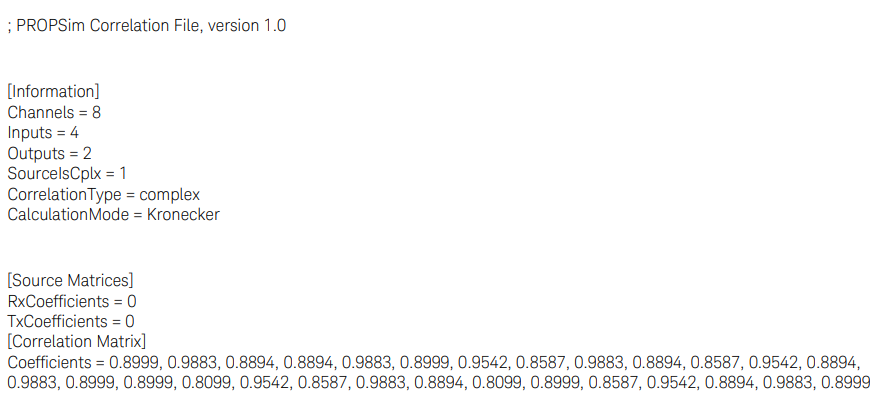
This file is a text-based format, and a sample is included in the installer. Due to modeling physics, the correlation matrix must be positive semidefinite, that is, the eigenvalues must be non-negative (zero or positive). An error message appears if mathematical criteria is not met.
Example
Below is an example of a correlation matrix file format. The file is a text type with the suffix. COR. This file can be used in Path MIMO-matrix information when using “User Defined”- type.
The format is straightforward and as follows:
The number of inputs and outputs corresponds to the MIMO topology. For example, if the Channel Studio TDL application has settings for 4 TX antennas and 2 RX antennas, set the inputs to 4 and the outputs to 2 in the correlation matrix.
Correlation values are taken from the upper triangle of the correlation matrix.
|
SCPI Command |
[:SOURce]:RADio:CSTDl:FADing:PROFile:PATH<channel>:CORRelation:USER:FILE [:SOURce]:RADio:CSTDl:FADing:PROFile:PATH<channel>:CORRelation:USER:FILE? |
|
SCPI Example |
|
|
Couplings |
|
|
Preset |
|
|
State Saved |
Yes |
|
Initial S/W Revision |
A.19.00 |